
Data-Heavy UX
Internal Platform
Design System
B2B · Sweden
Unifying solar operations across sales & installation
Led end-to-end UX design as the sole designer on an internal CRM spanning sales, project coordination, and installation, from discovery research and stakeholder alignment through to design system governance and post-launch iteration.
COMPANY
Sesol AB
MY ROLE
Sole Product
Designer
DURATION
3+ years
PLATFORM
Internal web
app
USERS
200+
* Unfortunately, since the project is confidential because of my employer's NDA contract, it isn't possible to share more details about the design deliverables. If you have any questions about the process or any particular aspect of the project, let me know.
Executive summary
THE PROBLEM
200+ users across three teams working from scattered, disconnected data
Client records, installation details, and project planning lived in separate tools. Sales couldn't create orders quickly, and project coordination received incomplete handoffs from the sales stage.
MY ROLE
Sole designer, led research, stakeholder alignment, and end-to-end delivery over 3+ years
Owned the full design process: discovery research, as-is process mapping, stakeholder interviews across 8 roles, user flows, prototyping, and design system (MUI) governance. Collaborated closely with dev, QA, and product owners throughout.
CORE DESCISION
Reframe the goal from interface migration to data centralisation
Research revealed the real problem wasn't the UI, it was fragmented data. The sale creation flow was redesigned to consolidate client data into a single source of truth, eliminating manual steps and reducing input across multiple disconnected fields.
-45%
Sales creation time, measured via user interviews and Hotjar post-launch
-35%
Project management effort, reduced by connecting sales flow directly to Blikk (external project management tool)
+30%
Platform engagement, tracked via Hotjar reports after redesign
25%
Faster UI delivery, enabled by the MUI design system foundation
Strategic context
Sesol had no unified operational system. Sales, project coordination, and installation each ran on disconnected tools, with no shared source of truth.
Client data, contracts, and project details lived across a proposals tool, a pricing calculator, and SharePoint. Every handoff between teams required manual re-entry, creating slow sales cycles, incomplete project records, and site teams arriving without accurate information. The brief asked for a platform migration. The real problem was operational fragmentation across the entire company.
DEFENDING CONSTRAITS
-
200+ users across 3 teams with distinct workflows
-
Live migration, system had to stay functional throughout
-
NDA limits on shareable deliverables
-
Sole designer, end-to-end ownership across all phases
WHY IT MATTERED
-
Slow sales creation directly impacted revenue cycles
-
Incomplete handoffs caused project delays and rework
-
Installation teams lacked reliable site data before arrival
-
Fragmentation was blocking the company from scaling
1
Discovery
As-is mapping
Mapped the full ecosystem of tools, teams, and broken handoffs. Reframed the goal from interface migration to data centralisation.
User interviews
Process mapping
Problem reframe
2
Delivery
To-be system
Designed and delivered the centralised platform with API integrations across Oneflow, Blikk, Visma, and Zendesk, connecting all three teams in a single workflow.
Oneflow
Blikk
Zendesk
MUI
Visma
3
Improvements
Future vision
Led stakeholder research across 8 roles to identify the next layer of gaps. Produced design proposals for an expanded, HubSpot-integrated system.
Stakeholder research
Design proposals
Hubspot
Key design desicions
OPTION CONSIDERED
1
Sale creation flow
Sales reps worked across disconnected tools: a proposals tool for quotes, a separate pricing calculator for product configuration, and SharePoint for storing signed contracts and loan authorisations. Every handoff required manual re-entry of client data across systems.
Proposals tool
Pricing calculator
SharePoint
2
Sales → project handoff
Once a contract was signed, project coordinators received incomplete information from the sales stage. Projects were created from scratch in Blikk without access to the sale data, requiring coordinators to re-enter client and product details manually.
Manual handoff
Blikk (standalone)
3
Installation readiness
Installation teams required accurate project and safety information before arriving on site. HSE plans and Project Inspection forms existed as separate external documents, hard to locate, often outdated, and disconnected from the project record.
External HSE docs
Separate inspection forms
DESICION MADE
Centralised the entire sales flow into one platform. Quote calculations, contract generation via Oneflow, and file storage all happen within the same system, connected by API so users never lose traceability. Once a contract is signed in Oneflow, it is stored internally and the record moves forward automatically.
Oneflow API
Connected project creation directly to the sale record via Blikk API. When a sale moves to project coordination, a project is created in Blikk and a Zendesk ticket is generated automatically, no manual re-entry, full traceability from sale to project
Blikk API
Zendesk API
Integrated HSE and Project Inspection forms directly into the platform workflow, triggered automatically when project coordination is complete. Installation teams access all site-specific safety and project data in one place, within the same system they already use.
OUTCOME
-45% Sales creation time. Eliminated manual re-entry between tools and removed the SharePoint dependency for contract storage.
-35% Project management effort. Coordinators no longer rebuild sale context from scratch; the handoff carries all relevant data forward.
+30% Platform engagement. A single workflow spanning all three teams, sales, coordination, and installation, replaced the need to switch between external tools for site readiness.
1 Discovery
What was broken, and why
Mapping the existing system before designing anything new. User interviews, stakeholder sessions, and as-is process mapping revealed that the real problem wasn't the interface, it was fragmented data and broken handoffs across three teams.
From brief to real problem
Stated brief
Migrate an outdated system to a new platform
Move to a more centralised platform
Improve workflows across sales, project coordination, and installation
Replace a system that was no longer meeting the team's needs
Reframed problem
Operational fragmentation across the entire company
Client data, products, and installation details scattered across disconnected tools
Every handoff between teams required manual re-entry, slow sales cycles and incomplete project records
Installation teams arrived on site without reliable, up-to-date information
As-is process mapping
Before designing any solution, the full as-is workflow was mapped across all three teams. The seller stage alone required jumping between three disconnected tools: Adversus for meeting booking, CALC for pricing, and a separate proposals tool for quotations, none of which shared data. Every record had to be manually transferred between systems. This mapping made the real problem visible: the issue wasn't the interface, it was the operational disconnection between tools, teams, and data.

Extract from as-is status flow - Seller stage
Discovery methods
Discovery combined three methods to understand the full scope of the problem: user interviews with sales, project coordination, and installation teams revealed where workflows broke down in practice; as-is process mapping exposed the handoff gaps between tools and teams; and stakeholder interviews across sales, project and installation departments identified shared pain points across the organisation. Together, these methods shifted the project goal from interface migration to data centralisation.

Extract from questions bank for interviews
2 Delivery
What was built, and how
Designing and delivering the centralised platform, connecting sales, project coordination, and installation in a single workflow. Three API integrations, Oneflow, Blikk, Visma and Zendesk, eliminated manual handoffs and created one source of truth across the operation.
To-be system & integrations
Connected workflow across all three teams
The new system connected sales, project coordination, and installation into a single platform. Rather than replacing the external tools teams already relied on, the design integrated them via API, keeping familiar tools in place while eliminating the manual data transfer between them.
System map (full ecosystem)

New to-be system that includes external systems for better process automatisation
Each integration served a specific handoff point. Oneflow handled contract generation directly from the sale record, once signed, stored internally without manual upload. Blikk connected the approved sale to project creation automatically. Zendesk generated a support ticket at the same moment. Visma generated invoices for the comercial department once the project was approved by project. HSE and Project Inspection forms were embedded into the workflow and triggered when coordination was complete, so installation teams had accurate site data before arriving on site.
System map (full ecosystem)
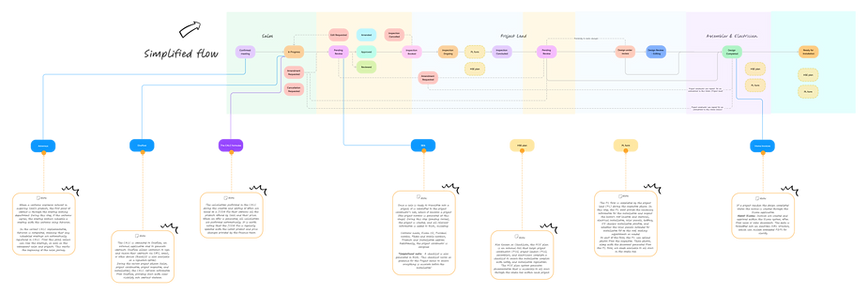
System simplified flow with sale and project statuses
Design process & iteration
Wireframes → feedback → hi-fi
Design concepts and early flows were shared with development, QA, and stakeholders before any high-fidelity work began. This surfaced feasibility issues early and reduced late-stage rework. Figma prototypes were used in sessions with product owners and end users to validate new flows and functionality, grounding decisions in observed behaviour rather than assumptions.
Sales & Project main table

A unified table (visible for all users) view displaying all sales and their statuses was designed to be accessible across all departments. This allowed every team member to track where each sale was in the process and take quick actions based on their role and needs. The concept was built around data traceability, using color-coded indicators to signal when and what type of action was required.
Creating a new sale

The sale creation process was unified into 5 steps organised by category, allowing users to move back and forth between steps to make changes before submitting the contract to the customer. This structure enabled a faster, more accurate sale completion. Once the sale was created, the contract was automatically generated during the final step. The CPQ was built on this same logic, data entered at each step fed directly into the price calculation, eliminating redundant input.
Media tab

Research findings identified fragmented documentation as the main pain point across all three teams. In the as-is flow, documents generated during sales, project coordination, and installation were uploaded manually to SharePoint, a process prone to errors, miscommunication, and significant time and effort.
Implemented system
Delivered & in production
The delivered platform centralised the full sales and installation workflow for 200+ users. Key screens included a role-aware dashboard with live sales data, a redesigned sale creation flow, customer management, offer tracking, and a notifications system, all built on an MUI design system for consistency and maintainability.
Dashboard

Through regular user testing sessions and business reviews, the elements and data displayed on the dashboard were defined collaboratively. The dashboard gave users a way to track their performance on a regular basis and identify the actions needed to meet their individual and team goals. Its primary purpose was to serve as a starting point, a front door, where users could plan their activities for the day and the days ahead.
Creating a sale
Create new sale - Attachments tab

After testing early concepts and iterating following the platform launch, it was determined that each sale could include multiple proposals for the client to choose from. The original layout was reorganised to optimise use of space and make the interface more intuitive, allowing users to add richer details to each sale, including comments and tags, to support better follow-up processes.
Customer address step

The customer address step was redesigned as part of the implemented system, giving users a more visual way to confirm and input the installation address. This was particularly important in the Swedish context, where addresses in rural and remote areas outside cities can be difficult to locate through standard input methods.
Attachments (previously as Media tab)

The media tab was redesigned and renamed Attachments as part of the implemented system, reflecting an expanded scope. Installation teams required a wider range of files to be centralised alongside the sale and project records. Centralising this documentation reduced the errors and miscommunication that had occurred in the as-is flow, where files were uploaded manually across separate systems.
Notifications

The notifications system was designed around the specific information users needed to take action, each notification surfaces the sale or project status, relevant client data, and the action that triggered the alert, giving users enough context to determine their next step without navigating away. Although the implemented version was intentionally kept simple, the design decisions were grounded in user feedback gathered during and after launch. Identified areas for improvement were documented and carried forward as inputs for the redesign proposals in the next phase.
Comments tab

The Comments tab was introduced to centralise communication across all teams involved in a sale, giving sales, project coordination, and installation a shared space to exchange updates, flag issues, and document decisions related to the same record. Before this feature, relevant information was exchanged through separate channels, making it easy to miss critical context as a sale progressed through each stage. By keeping all communication attached to the sale record itself, the feature reduced information gaps between teams and improved transparency across the full workflow.
3 Improvements
What comes next, and why it matters
After launch, stakeholder research across 8 roles identified the next layer of gaps. This phase produced design proposals for an expanded system, including a HubSpot integration to close the last fragmentation gap between external CRM and internal operations.
Stakeholder research
8 roles · interviews · synthesis
After launch, structured interviews were conducted with 8 roles across the organisation, CFO, Marketing, Support, Operations Manager, Head of Sales, Commercial, Purchase, and Logistics, to identify the next layer of unresolved friction. Each stakeholder had different priorities and collaboration touchpoints, so findings were synthesised into shared themes rather than individual opinions: data fragmentation, workflow inefficiency, and integration gaps.
Stakeholder interviews - Questions bank & Interview script

Following the platform launch, a new round of structured research was conducted to identify the next layer of operational gaps. A questions bank and interview script were developed to ensure consistency across all 8 sessions, covering roles from CFO and Head of Sales to Operations, Logistics, and Support. The script was designed to surface friction points that had emerged after the system went live, rather than assumptions made before it.
Stakeholder interviews - Notes
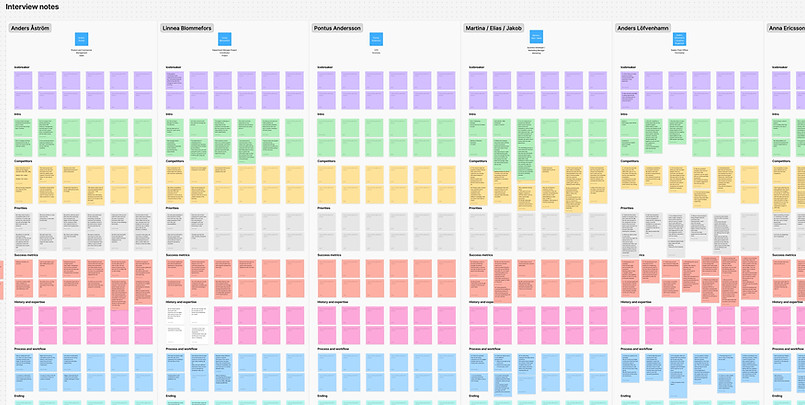
Each of the 8 stakeholder sessions was documented through structured notes, capturing priorities, pain points, and collaboration touchpoints specific to each role. Rather than treating each session in isolation, notes were captured with synthesis in mind, identifying patterns across departments that individual opinions alone would not have revealed.
Debrief: Categories & Themes

Interview findings were synthesised into recurring themes: data fragmentation, workflow inefficiency, and integration gaps. Organising insights into shared categories rather than individual responses created a common language across departments, making it possible to present findings to stakeholders and align around a shared direction. From this synthesis, a set of assumptions and hypotheses were defined, framing the identified gaps as testable propositions to guide the next design phase without overcommitting to solutions before further validation.
Stakeholders power-interest matrix

A power-interest matrix was used to map each stakeholder's level of influence on the product and their degree of involvement in day-to-day operations. This made it possible to prioritise whose input shaped which decisions, ensuring that the research findings were weighted appropriately when defining the scope and direction of the redesign.
Assumptions & hypotheses
Debrief conclusions from stakeholder research
The synthesis of stakeholder interviews produced a set of assumptions and hypotheses about where the platform needed to evolve. These were framed as testable propositions, not final decisions, to guide the next design phase without overcommitting to solutions before further validation. The three recurring themes (data fragmentation, workflow inefficiency, and integration gaps) became the foundation for scope and prioritisation.


The stakeholder research debrief produced two sets of assumptions and hypotheses, organised around the opportunities identified across all sessions. Each assumption was paired with a testable hypothesis and a set of early validation actions, framing the findings as a starting point for design decisions rather than conclusions.
The first set focused on the tool itself (CALC): how it could evolve to support sellers more effectively through CRM-like features, better customer transparency, and reduced manual work between tools. The second set addressed the broader organisational level: product and pricing competitiveness, contract clarity, project coordination visibility, and cross-department communication gaps.
Together, the two sets defined the design direction for the next phase of the platform, grounding the proposals in what stakeholders had described as friction, rather than assumptions made before the research.
Design proposals & future direction
Not yet implemented
Discovery combined three methods to understand the full scope of the problem: user interviews with sales, project coordination, and installation teams revealed where workflows broke down in practice; as-is process mapping exposed the handoff gaps between tools and teams; and stakeholder interviews across sales, project and installation departments identified shared pain points across the organisation. Together, these methods shifted the project goal from interface migration to data centralisation.
Redesign: Dashboard

The redesigned dashboard was developed collaboratively with the sales team and business stakeholders, reflecting the need to evolve the platform towards a more CRM-oriented experience. The new design incorporates HubSpot integration to provide better visibility into lead sources and sale types. Visual indicators were improved throughout, including installation renders as contextual references, with the option for users to attach their own images. The dashboard now surfaces a meetings summary, a contracts overview, and a quick calculation tool to avoid creating a full sale record when only a price estimate is needed. Sales summaries are displayed with hover interactions for faster scanning, and a notifications panel keeps users informed without leaving the main view.
Redesign: Create new sale

The redesigned sale creation flow retained the multi-offer logic introduced in the implemented system, while improving how offer statuses are surfaced, making it easier to track all active proposals within a single sale at a glance. Customer information was restructured to accommodate clients with more than one property, reducing the friction that occurred when the same customer appeared across multiple addresses or installations.
New section: Customer book

The Customer Book was introduced as a dedicated client directory, designed to support closer customer relationships and more proactive sales follow-up. Each entry consolidates all offers associated with a client across different properties and addresses in one place. The section was designed to be fed by HubSpot, keeping internal records in sync with external CRM data. Users can search by client details or browse alphabetically, making it practical for both quick lookups and systematic review.
New section: Callbacks & to do's

The Callbacks and to-do's section was introduced to centralise task management within the platform, reducing the need for external tools to track follow-ups and pending actions. Designed around the core functionality of a CRM task manager, it allows users to create, edit, and delete tasks directly within their workflow, keeping all sales-related actions in one place and making individual and team organisation more straightforward.
New section: Offers dashboard

The Offers Dashboard provides a visual overview of all active proposals, showing which have been signed, which are pending, and where follow-up may be needed. This gives sales users a clearer picture of their pipeline and a practical basis for deciding when to re-engage with a client or adjust their approach. The view also supports goal tracking across weekly, monthly, or custom time ranges, helping users monitor progress against targets without switching between tools.
Redesign: Notifications

The redesigned notifications panel was built to provide more granular, actionable updates tied to specific sales events, such as when a client views an offer, signs a contract, or when a team member adds a comment. Rather than surfacing generic alerts, the new design connects each notification to its relevant context, allowing users to respond quickly without having to navigate back to find what changed.
Outcomes and lessons learned
The new internal web application is currently being implemented and used by the users, aiming to streamline workflows and improve efficiency for employees involved in solar panel installations.
Key lessons learned:
-
User collaboration is crucial: Engaging with end users and stakeholders regularly helped us make informed decisions that directly impacted the final product’s success.
-
Design systems ensure scalability: Adopting MUI for the design system helped us build a consistent user experience across the platform while making it easier to maintain and extend.
-
Balancing multiple needs: Designing for a diverse user base (sales, coordination, installation) required flexibility and a clear prioritization of features.
-
Iterative development: Regular feedback from development, PO, and QA teams ensured we were always aligned and able to address issues early in the process.
-
This project reinforced the importance of collaboration and user-centered design in delivering a high-quality solution.


